Fusion 6 is out, and i wanted to test something that has been gathering dust on my harddisk because the script simply could not be done natively in Fusion 5.
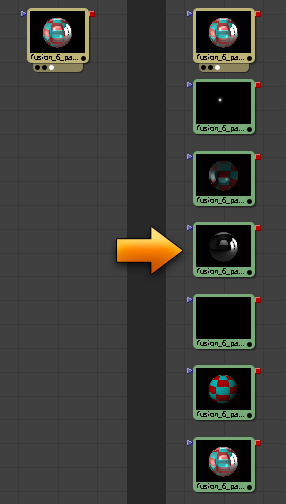
But here’s a quick prototype on a script that takes a multi channel EXR file and creates new loaders with the same EXR file but assigns groups of channels accordingly to the RGBA channels so it is ready for easy comping.
Now this is as i said, a prototype, it requires an EXR file that contains channels like the channel names in the example file below (rendered with Autodesk Maya passes), there’s no GUI, it doesn’t do any error checking or anything fancy to check for channels that can or can’t be grouped.
Should the script fail and your comp seems to stop working or responding, try typing the following in the command line (it means it failed between the locking and unlocking of your comp and is thus locked and needs to manually be unlocked again)
comp:Unlock()
 hos_SplitEXRFusion 6.x, 7.x, 8.xversion: 1.7
- hos_SplitEXRFusion 6.x, 7.x, 8.xversion: 1.6
- hos_SplitEXRFusion 6.x, 7.xversion: 1.5
- hos_SplitEXRFusion 6.xversion: 1.4
- hos_SplitEXRFusion 6.xversion: 1.3
- hos_SplitEXRFusion 6.xversion: 1.2
- hos_SplitEXRFusion 6.xversion: 1.1
- hos_SplitEXRFusion 6.xversion: 1.0
- show previous versions
- hide previous versions
download : fusion_6_passes.exr
changes in v1.5
- Fixed the preference saving on Win 7 and 8. This is the same problem that occurs on all tools that use the script preference saving function this tool uses.
- Added Fusion 7 support by explicitly using ipairs when iterating table value key pairs.
changes v1.4
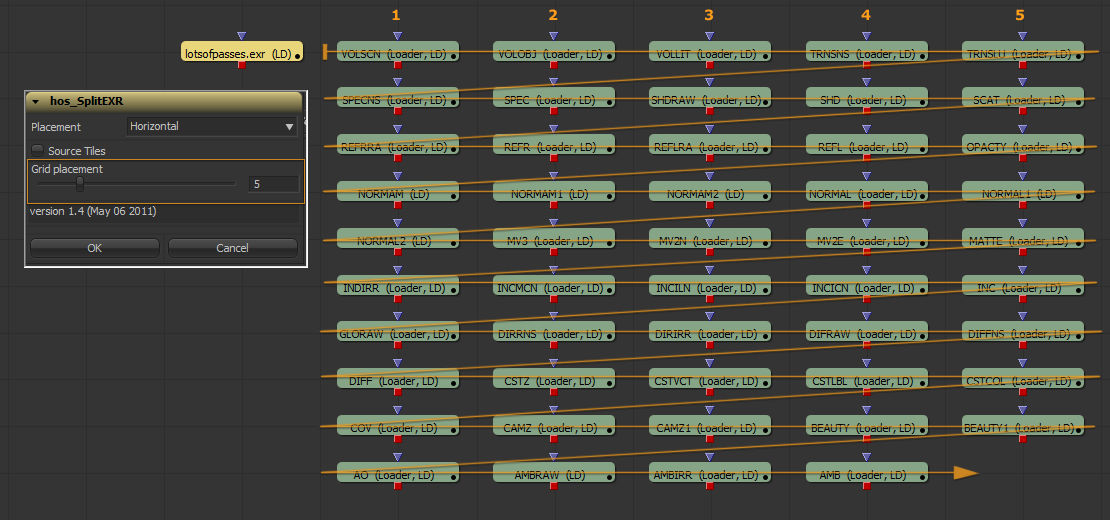
- Created Loaders can now be placed on a grid (every nth loader the placement will start over on one axis and step one position further on the other axis.)
Setting grid placement to 0 makes the script behave in the old way, setting the grid placement to 1 reverses the placement direction (obviously.) - Placement on y-axis can now be set to tiled, so when loaders are set to force source they won’t overlap anymore.
- Script settings are now stored in between session.
changes v1.3
- Added Loader naming function to create Loader with channel group prefix name.
changes v1.2
- Added a TOOLST_Clip_FormatName check to fix the ’attempt to index global ‘tool’ (a nil value)’ error.
changes v1.1
- XYZ channel data is now recognized and mapped to RGB channels
- Added a GUI where you choose how the split EXR loaders are placed (Horizontal or Vertical)
changes v1.0
- Prototype and initial release



I tried this script but I get error.
error : attempt to index global ‘tool’ (a nil value);
Which Fusion are you running, i assume Fu6 as Fu5 usually doesn’t report anything when running the script.
Does it do this with all your EXR files? Could you send me an example EXR file that produces the error?
You can send the file to sven [at] houseofsecrets [dot] nl
Hi i have the same errormassage like abhay sharma.
Whenn i use your EXR File in Fusion 6 i get this Error:
error : attempt to index global ‘tool’ (a nil value);
Hmmm…i wonder what is going on.
Could you email me the EXR file that produces this error?
I’ve send you the details via email.
Sven
Hi i use the your EXR ( fusion_6_passes.exr ) File wich you can download on your Site.
thanks
Hi again maybe my workflow is wrong.
I load your EXR File in the Fusion Comp and activate it than i go to the Script Menu and execute the hos_splitexr. After this i get the error messages
That’s odd, downloaded the script and EXR from the blog just to be sure, but over here it works like a charm, i have no idea what goes wrong.
In order to run the script, do you right click on the EXR file and from the RMB menu choose the script (i’m not sure there’s another way to get access to Tool scripts that i’m missing)
Just to be sure we use the same Fusion version.
Which build of Fusion 6 are you using?
Hi, your tool works nearly fine. Open my EXR with 8 Channels inside, and your script splits up all, but only 6 in the right way, the other 2 loaders have no entry in the R G B A . And often your tool missed the Alpha of the channel. But work on, and it could be very helpfull! nice work so far
Could you send me a comp and some footage that shows this behaviour, it would help a lot to see why it does something on someone else way of working.
okay, seems that the channels, wich not have the R G B values like Z , or motionvector ( X Y Z) , will extracted but are empty… download the sample comp from here, and let me know: w_w.suedlich-t.de/ftp/UPLOAD/hos_SplitEXR_isotrontest_F6.rar
so this was easy to manage…. i only added the if else statement at the end of your script for X Y Z .
but , sry, whats with the name, the correct name “channel: filename” is only visible in the viewport, but not in the flow (there´s only the filename) . When i rename the ne loaders, it shows the “channel:filename” …… can u fix this? 😉
okay, check this , sorry for spamming 🙂 ” myLoader:SetAttrs{TOOLS_Name = loaderList[i], TOOLB_NameSet = true} ”
only the channelnames appears, but the filename get lost, but therefor the original exr file is in the flow too. …. i like it so… maybe u can update your script? if u like 😉
Thanks Stefan, the data you send really helped picking out some errors and things i missed when writing the prototype.
I posted version v1.1 of the script, v1.2 will add some more features (like channel mapping options, loader naming, etc)
http://www.svenneve.com/?p=470
hi Sven thanks the option to load the script with the mmb works now fine.
But i have anoter Question.
I created a multichannel exr File in Maya and when i pick and drag it into my workspace in Fusion 6 to try the script i get on imort a error message:
[string”composition”]:1:´´expected near ´char(1)´
maybe someone knows what this is. This Error messages apears when i drag it into fusion.
And whenn i use the Import menue nothing happens. The Workspace is empty
thanks
Hi again
Now it works fine.
I Forgot to set the Framebuffer in Maya to RGBA (Float)4x32Bit
With the setting in the Framebuffer in Maya RGBA (Byte)4x8Bit it make the Error Message.
I get this error:
…eon/Fusion 6.0/Scripts/Comp/hos_SplitEXR.eyeonscript:39: attempt to index global ‘tool’ (a nil value)
It worked one time, I don´t know why, but no more. Thanks
Hi Juan,
This error should only occur if nothing is selected, not sure why some people get this error.
I can’t check at the moment as i have no access to a copy Fusion at the moment, but could you see what happens if you select the loader first and then run the script?
Okay, just checked via remote desktop, when i first loaded an exr file i got the same error when i used print(tool:GetAttrs()), the second time running the command didn’t.
I have no idea why this happens, but atleast i’m a step further.
If you type print(tool:GetAttrs()) and it gives the error, could you then deselect and reselect your loader and run the print(tool:GetAttrs()) command or the script again to see what happens?
Hmmm…i seem to have found something.
When i create a new comp, create an EXR loader and then immediately run the script, the error occurs, when i deselect and reselect the loader and then run the script it works.
I’ll do some more testing, but i guess this might be a bug that is more related to Fusion itselve rather than my script.
Yeah same NIL error here : )
Hi! I’ve tyied the hos_SplitEXR v1.4,but it gave me an error :” …eon/Fusion 6.2/Scripts/Comp/hos_SplitEXR.eyeonscript:101: attempt to index global ‘tool’ (a nil value)”, i used your EXR file fusion_6_passes.exr,not work! I’m use fusion 6.2 32bit!
Did you put the script in the Script/Tool directory? It’s quite finicky with that.
If it still gives trouble, you can sent me a frame to test.
Hi Sven,
I was looking for exactly this script. It would be so helpful if it would work but I’m not able to get the passes right.
The good thing is that I don’t get ant errors and the new loaders are placed as it should.
The bad thing is that the new loaders contain “None” at the Channels list. Even though the results from Console seems fine…
uvramp.b matched : uvramp
uvramp.g matched : uvramp
uvramp.r matched : uvramp
or..
direct_shadow.b matched : direct_shadow
direct_shadow.g matched : direct_shadow
direct_shadow.r matched : direct_shadow
direct_noshadow.b matched : direct_noshadow
direct_noshadow.g matched : direct_noshadow
direct_noshadow.r matched : direct_noshadow
I use Fu6.2 b897. The EXR files are rendered with Houdini.
Tried with more files (different passes) but the result is the same.
Can you give some advice what do I miss?
thanks,
Attila
After some investigation based on the pigsfly forum I’ve found that the porblem is the case sensitivity of the channel indexes. After modified your script it works fine.
Many many thanks for it!
What I did with your script is simple. At line 200 there is an if block. I duplicated the whole and replaced the capitals with small letters. Now it has “RGBAXYZ” and “rgbaxyz”
Thanks again for this timesaver.
Hi Sven,
I just wanted to tell you once more how useful this script and how grateful I am.
The thing is that I can’t doing make some small requests to you 🙂
1. It would be so nice if it would remember the frame settings of the original loader (clipping; global in/out; frame hold)
2. The other thing is it works only with one loader. I know I know but what if it could work with all selected loaders and place the passes next to each. Hmm?
However these are only suggestions but it’s beyond my knowledge to add these modifications to the script.
cheers,
Attila
Hi Sven,
I am stock with version 5.2 of fusion, been loading those exr files manually for a while and I going crazy.
I use my EXR and fusion_6_passes.exr to test it out.
When I run the script, (I actually tried them all wondering if it would be a fusion version issues), the Script Panel is loading but then when I press OK nothing happen. No errors either.
Is there a anything related to version 5.2 that I need to modified the script?
Hi Frederick, as far as i know, this tool was only possible with Fusion 6 as there was a bug or feature not working in 5 that allowed for querying the exr channels on loader.
I don’t have 5 installed anymore so i can’t check if a workaround would have been possible.
Sven
Hey Sven!
Thanks for the great script. For the first time I’ve run it,
got the same the same error message like the others:
> Error: attempt to index global ‘tool’ (a nil value);
but I could fix it! the error was caused by:
attrs = tool: GetAttrs ()
and i replaced this line with the following code:
tool = comp:ActiveTool()
attrs = tool:GetAttrs()
and for me it works fine.
Yeah, i should add some nil error- and whatnot checks to this, it is way to volatile at the moment.
Hi Sven,
thanks for the script! Great job, works fine for me.
Cheers
Peter
Pingback: Fusion : hos_SplitEXR v1.1 | svenneve.com
Pingback: Fusion: hos_SplitEXR_V1.4 | svenneve.com
Pingback: Fusion : hos_SplitEXR v1.2 | svenneve.com
Is it posible to your script works with theses two test exr files in fusion6.4
Both files contains all channels that supports vray and mentalray render engin in 3dsmax2013.
http://www.mediafire.com/?vav6lcryvg2tw39
By the way, nice works, and thanks in advance
Wow Good Scripts~~~~
It Works on Fusion 6.4….
But It doesn’t work on Fusion 7
…s/eyeon/Fusion 7.0/Scripts/Tool/hos_SplitEXR.eyeonscript:56: attempt to call a table value
I am not a coder so what I’ll give you as a solution is terrible, but if you want to nastily fix the script, you can remove lines from 31 to 78, and lines 146 and 167. It will remove the part of the script that was saving your preferences for the window, if I understand it correctly. The main goal of the script will work fine.
Hi Chafouin, this was a bug we fixed internally, it has to do with the way Windows 7 and 8 protect folder that are not in the user folder.
I’ve uploaded the latest version now. Try downloading it and let me know if this fixes the error.
Since i’ve upgrade Fu to 7.7, and by the way my Workstation on win 10. i’ve got this warrning :
Blagic Design/Fusion/Scripts/Comp/hos_SplitEXR.eyeonscript:107: attempt to index global ‘tool’ (a nil value)
And the script doesn’t work. go an idea ?
ps : my fu run on admin, full admin acces to Blackmagic install.
I follow Poor comment at February 8, 2012 at 16:02
finally replace :
attrs = tool: GetAttrs ()
by
tool = comp:ActiveTool()
attrs = tool:GetAttrs()
and it rocks !
Thanks again,
++
Hi Sven!
I try to use it with a exr 3d render in fusion 8 and I get this error:
OpenEXR: Error reading pixel data from image file “D:\-\-\-\-\-\-\-r”. No frame buffer specified as pixel data destination.
OpenEXR: Error reading pixel data from image file “D:\-\-\-\-\-\-\-“. No frame buffer specified as pixel data destination.
direct_diffuse failed to load file D:\-\-\-\-\-\-\-” (clip “D:\-\-\-\-\-\-\-” at frame 0)
direct_diffuse failed at time 0
What can I do? I didn’t install it correctly?
Thanks again, ++!
“D:\-\-\-\-\-\-\-” it’s my file directory.