Lightwave : Anaglyph Stereo previewing in OpenGL

January 26th, 2010

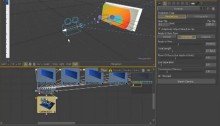
Been busy on a video to illustrate a nice work around to a missing option to view anaglyph stereo in the OpenGL viewport in LW. Parts of it have been gathering dust on my hard disk since before last Christmas and i was never satisfied with it, so i scrapped the lot and started over last night in a bout of insomnia, it’s a pretty rough edit, it doesn’t always flow too well, but it does get the message across.

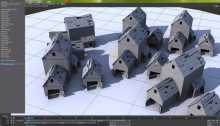
The ‘US Military Base’ model i used in the video is a model by Jon Fletcher and was downloaded from TurboSquid, i tweaked it a bit for my stereo work flow videos (mostly repositioning of items and the addition of some large scale terrain.)

My Layout preferences are pretty much out of the box settings, with the exception of the Shading Method that has been set to GLSL Shaders and my DOF/MBlur Preview Passes is set to 2 for this video.

And on a last note, i apologize before hand for the crappy audio quality (I’m still using a 20 euro Logitech headset for this, for now) and for the lots of ‘uhms’ and ‘ahs’ as i struggle to not stick my foot too far up my mouth (hey, it was late and English isn’t my native language)

Part 1

Part 2


Fusion : hos_SplitEXR v1.2

January 20th, 2010

Updated the hos_SplitEXR script to version 1.2.

This version should have the ’attempt to index global ‘tool’ (a nil value)’ error fixed.

I still have no idea why this seemingly random error occurred, but adding the extra TOOLST_Clip_FormatName check seems to have fixed it (at least i can’t reproduce it anymore as i could before.)

visit the original post for the updated version


Fusion : hos_incrementalSave v1.2

January 18th, 2010

Here’s an update to the incremental save script, for some reason the pattern matching function returned a nil value when a certain file name used (for example ‘vfx_shot_01_31-448.comp’ would break the gsub function somehow.)

So, as for changes made in this version :

  1. Changed the incremental save file pattern matching.

visit the original post for the update


Maya : hos_rampColorShift.mel

December 5th, 2009

Here’s another small function that i missed from my experience with Lightwave, it’s a script that allows you to shift the Hue, Saturation and Values of all color keys on the selected ramp node.
It has it’s own interface and i had to rewrite the RGB to HSV and the HSV to RGB code as the standard rgb_to_hsv and hsv_to_rgb functions clamp values to 0.0 and 1.0, which is a royal pain when your ramps are float and exceed 1.0 as value.

download : hos_rampColorShift_v1.0.zip

gradients_2


Maya : hos_invertRampPositions.mel

December 5th, 2009

Here’s a small function that inverts all the key positions on the selected ramp, a small feature i missed from Lightwave and wanted to bring to Maya.

download : hos_invertRampPostions_v1.0.zip

gradients_1


Maya : Create Reference multifunctional hotkey

December 5th, 2009

Here’s a small replacement for the default <CTRL> + <r> Create Reference command hot-key that adds some extra functionality.

This little function is actually quite simple, but allows one hot-key to do two things.
First, if nothing or a non referenced node is selected, the hot-key will simply function as Create Reference always did.
However, when a referenced node is selected, it will simply open up the Reference Editor.

Very simple, but a nice work-flow addition.

download : hos_ReferenceHotkey_v1.0

hosReferenceHK_01


Maya : open Reference in new instance of Maya.

December 5th, 2009

Ever work with lots of references in a scene and you keep opening new instances of Maya to tweak a referenced file as a workaround trying to avoid using the save reference edits because of the (well justified) fear of wrecking a perfectly good referenced asset?

Well, no more, here’s a way to add a new feature to the RMB menu and File menu in the Reference Editor that opens the currently selected reference in a new instance of Maya.

Before you start doing this, know that it involves changing the MAYA_LOCATION/scripts/other/referenceEditorPanel.mel file that is an essential part of Maya, so, BACKUP referenceEditorPanel.mel BEFORE PROCEEDING.

If you screw up files that are an integral part of Maya and you don’t have extra workstations with Maya installs that can be used to restore those files should you screw up, there’s only one way to restore those files, and that is a reinstall of Maya.

The procedure is very simple,
Open up the MAYA_LOCATION/scripts/other/referenceEditorPanel.mel file in your favourite script editor.
Go to the end of line 214 (Maya 2009 and 2010, x86 and x64 on Windows) and create a new line.
Copy the folowing piece of code.

1
2
3
4
5
6
7
8
9
10
11
12
		// START HOS EXTRAS
		// in Maya 2010 add at the end of line 214 of referenceEditorPanel.mel
		menuItem -divider true;
 
		menuItem
			-label ("Edit in New instance")
			-annotation ("Opens a new instance of Maya with the file")
			-command ("string $referenceFile[] = `sceneEditor -q -si $gReferenceEditorPanel`;" + "system(\"start \\\"\" + getenv(\"MAYA_LOCATION\") + \"/bin/maya.exe\\\" \\\"\"+$referenceFile[0]+\"\\\"\");")
 
			referenceEdInstance;
 
		// END HOS EXTRAS

And paste it at the newly created line.
Save, start Maya, and you are ready to go.

That’s it.

edit : I just noticed that Wordpress’ auto formatting screwed with the code, fixed it now (if you tried this and it didn’t work, Wordpress was the reason as to why.

ref_script_editor_01referencesEII_01referencesEII_02


Fusion : hos_PSDLayers.eyeonscript v1.0

November 18th, 2009

Hi folks, here’s a cleaned up and GUI-ed script that creates a Loader for each Layer in the PSD file and then merges these together or places each of the layers on an individual 3D Image Plane.

Here’s a small video explaining the script, sorry for the clickety-clicks in the audio track, i have no idea why my headset or recording software does this sometimes.

Hope you have some use for it.

download hos_PSDLayers v1.0


Fusion : hos_SplitEXR v1.1

October 29th, 2009

Updated the script to incorporate some features and fixes that where suggested by Stefan from südlich-t.

Added mapping of XYZ channel names to RGB.
Added a GUI with the placement option that handles the placement of split loaders (have not figure out how to grab these options from the user preferences yet.)

I will add the ability to choose what should happen with certain channel data mapping wise, and i will add an option to map Z channel data to either the RGB channels or the actual Z channel.

Keep posting any strange behaviour of course.

visit the original post for the update


Klik! Amsterdam Animation Festival Leader

October 14th, 2009

For the Klik! Amsterdam Animation Festival 2009 we created a leader.
Live action footage was shot on the Red One, modeling was done with Maya and 3D Coat’s incredible retopo toolset, rendering in Mental Ray, compositing in Fusion and editing in SpeedEdit.

Many thanks of course to all the folks who worked on this project, in their own time no less.

Klik! festival leader from House of Secrets on Vimeo.

 
grandiose-certain